
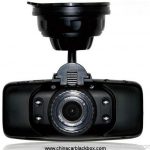
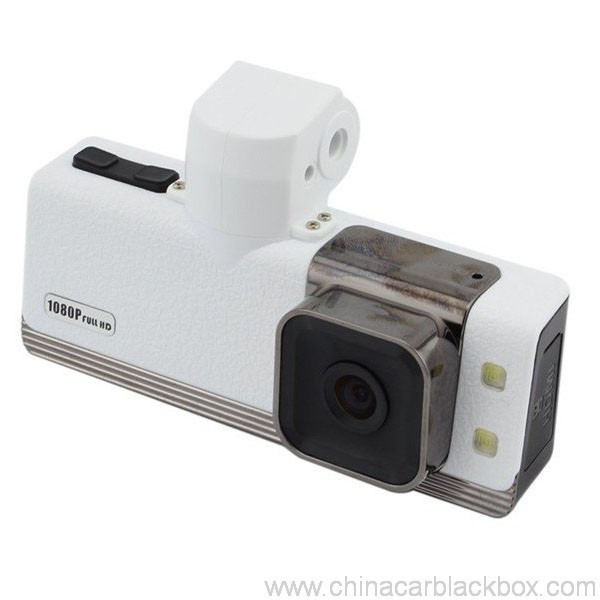
- Nkọwa
- Nyocha(1)
- Ajụjụ & A
- FAQ
- Ọmụma DVR
- OEM/ODM
Feature:
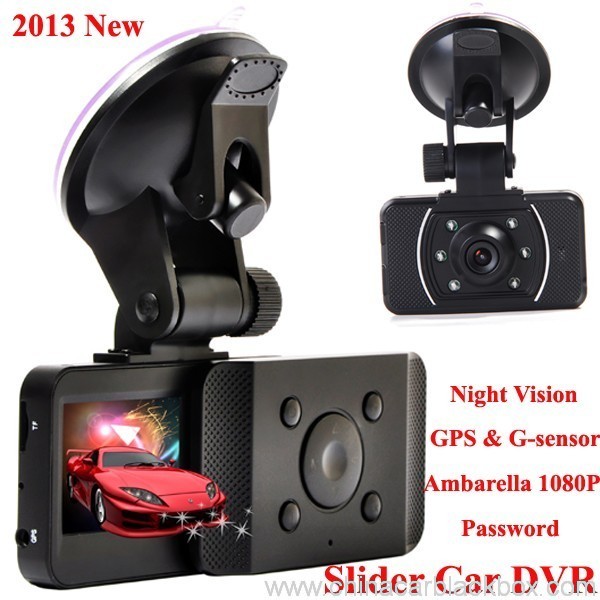
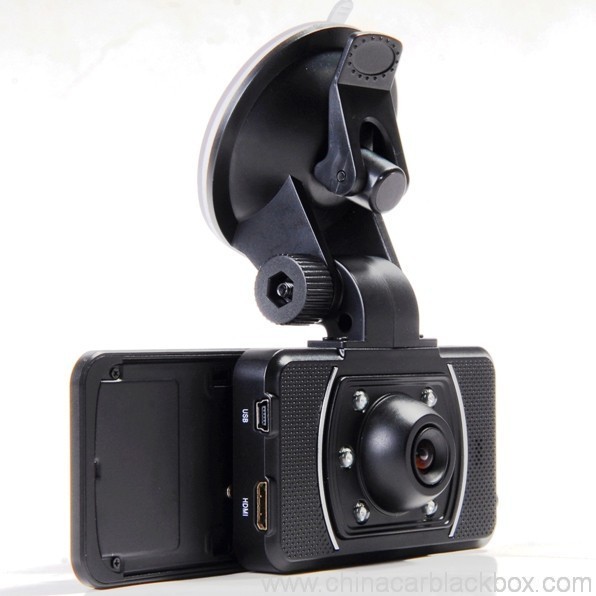
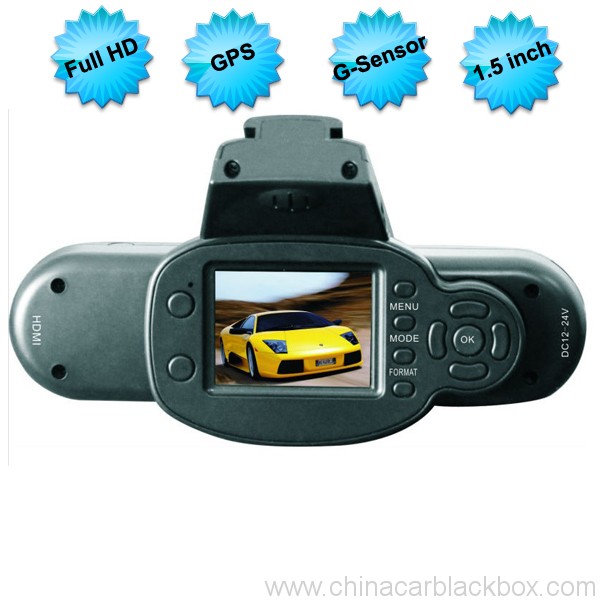
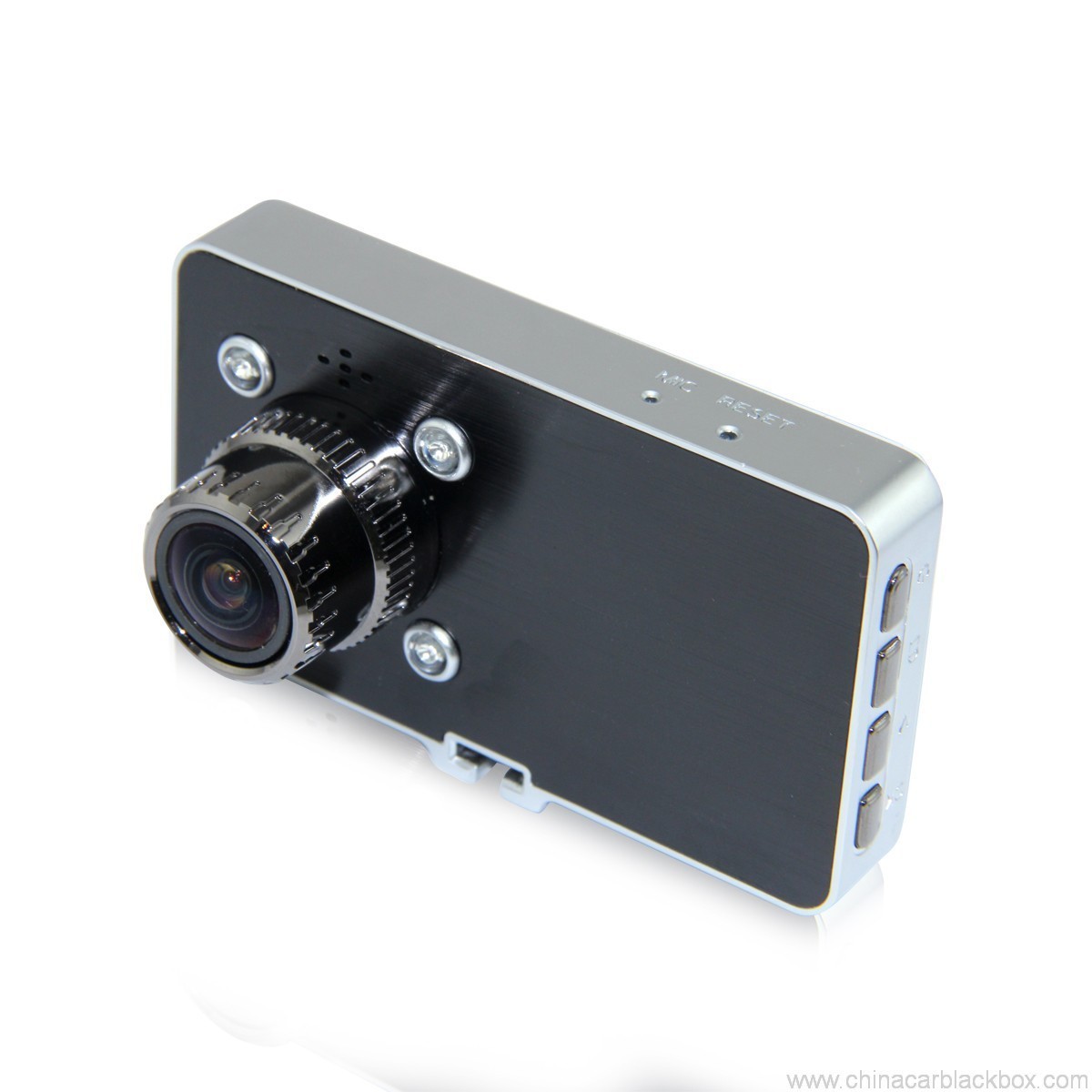
– HDMI high-definition video output
– 2.0″ TFT LCD
– 1920×1080@30fps /1440×1080@30fps /1280×720@30fps;
– GPS Tracker & G-ihe mmetụta
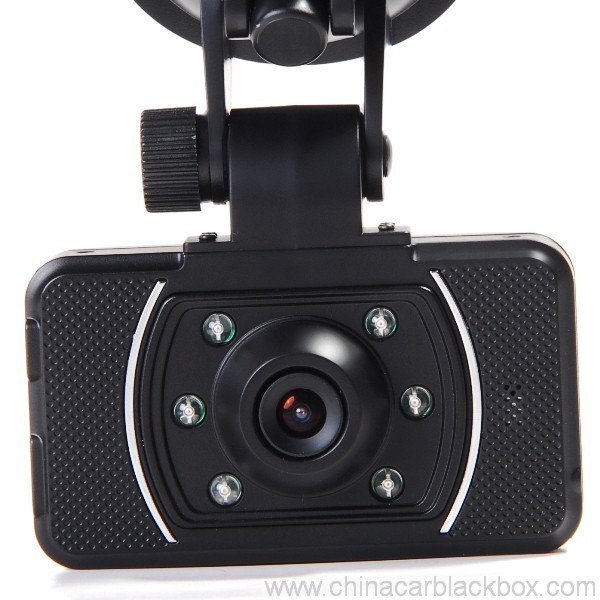
– High-definition wide angle camera, about 120~130 degree
– Video specs: H.264 (MOV)
– Cyclic Recording
– Date Sample: ON/OFF
– Delay Off
– built with microphone (speaker)
– Show Speed on video
– Supports high-capacity TF card
– Password: * * * * * *
Specification:
Circulating video: Off /1 nkeji /2 minutes /4 minutes
Mobile detection: High / medium / low / off
Automatically record video once there is power supply: On /Off
Startup delay: Off /5 seconds /15 seconds /30 seconds
Sound recording: On / Off
Television system: NTSC/PAL
Automatic shutdown time: Off /60 seconds /120 seconds /300 seconds
Format: Ee / no
Time setting: 2012.01.01 12:00
Time stamp: On / off
Automatically turn off LCD time: Off /30 seconds /60 seconds /120 seconds
Exit setup: Ee / no
Light frequency: 50HZ/60HZ
Acceleration sensor settings: 1/2/3/4/5/6/7/ no
| Screen size | 2.0 TFT LCD(4:3) ụgbọ ala dvr |
| Lens | MI5100 |
| Language | Chinese simplified/traditional Chinese /German/French/Russian/ Italian/ Spanish/Portuguese/Dutch/English |
| Video | 1920х1080@30fps/1440х1080@30fps/1280х720@30fps |
| Video format | MOV |
| Photo resolution | 16M |
| Photo format | JPG |
| Storage unit | Micro SD |
| MIC | Built in |
| Photos mode | Single photo |
| Light source frequency | 50Hz/60Hz |
| Television output | NTSC/PAL |
| USB | USB2.0 |
| Power interface | 5V 1500MA |
| System requirements | Windows 2000/XP/Vista/Windows 7,MAC OS x 10.3.6 and up |
1, Go to the password setting option,press key choose the digital, press OK key confirmation.
input initial code “0 0 0 0 0 0 ” to enter the password setup menu, now there are three options: enable/disable/reset password.
2, Reset password: input same password twice, otherwise reset password will fail.
Connect TV to watch the video and photos
Use the HDMI cable to connect device and television, turn on television to play the recorded videos and photos.
The device has a variety of shortcut operations:
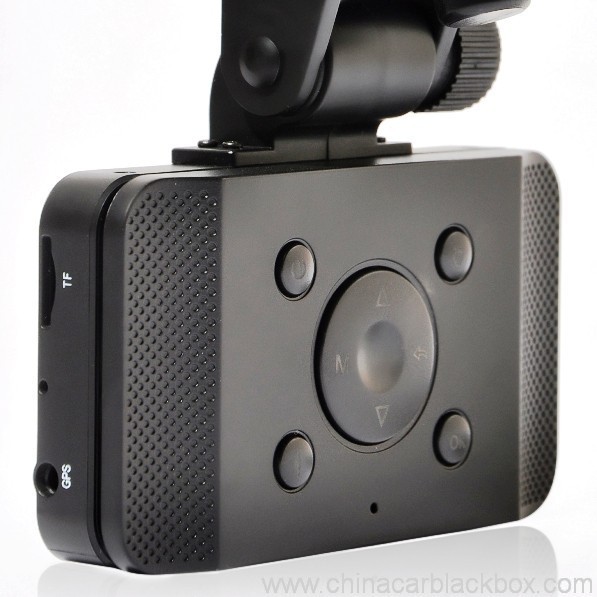
1, In standby mode, press “Down “, turn on/off Mic
2, In standby mode, long press “Voice / One button copy” button, turn off the sound.
3, In any mode, press the “Menu” can return to a the standby mode of recording video
4, In any state, close the slide to turn off the screen.
5. In standby mode, press ” Voice / One button copy ” to copy.
6, In video playback state, long press ” Mode / Return / Lock ” key to protect or unprotect.
7, In the standby of recording video or photographing, short press “Infrared / Delete” for the operations of infrared lamp.
Note:
1. Can use Mode button to switch between video and photo mode.
2. When the battery power is low, the device will automatically turn off the flash function.
Special function set
Password setting:
1. Can set password for the machine, the initial password is: 0 0 0 0 0 0 (six zeros)
2. After inputting initial password, can enable, disable or reset password.
3. You can set your password digit as you like.
Specific operation:
1, Go to the password setting option,press key choose the digital, press OK key confirmation.
input initial code “0 0 0 0 0 0 ” to enter the password setup menu, now there are three options: enable/disable/reset password.
2, Reset password: input same password twice, otherwise reset password will fail.
Browse mode
1. Turn on the device, automatically entering video mode. Press Mode button twice to enter video browse mode, press Mode button again to enter photographing browse mode, video and pictures will be shown on the screen.
2. Press UP or DOWN button to select the videos or pictures you want and press OK to watch.
Note: if enabled password, press Mode button twice to go to password interface and input password.
Delete files: in the process of browsing, press ‘ infrared / delete ‘ button to show Delete menu, select ” Ee” to delete single unprotected files and select the “all ” delete all unprotected video files.
Set language and voice prompt
Open the equipment, automatic into video standby mode, the short by mode button to enter the menu, into the language setting options, language Settings. Voice prompt according to set language broadcast tips
Date and time
To set the current time and date, in the standby mode, press the MENU button, and then use the up and down arrow keys to enter settings page. Set the date and time then press OK to confirm.
Time setting: 2012.01.01 12:00
Acceleration sensor settings
The acceleration sensor has a total of 8 options: 1/2/3/4/5/6/7/ NO
From 1 to 7, sensitivity is more and more high, choose NO to close sensor
Press one button to copy
In the video the standby mode, press “Voice /One button copy ” button to enter one button copy, at this time, the machine starts copying the last file from memory card to its memory.
Save files to computer
This device supports connecting USB cable to computer, after connecting to computer, there will be a dialog box pop up, select “USB connection ” to copy files from the memory card to your computer, or use the player in computer to play.
Note: if you set a password, select “USB connection ” then a password dialog box will bounce out, and connect to computer by inputting password, entering U disk mode.
Simple troubleshooting:
If a fault occurs, try to use the following method to exclude. If you cannot handle it, please contact customer service and repair department.
Not able to record video normally.
– replace SD / MMC card
– change the resolution and frames per second.
– change memory card with greater capacity.
– To ensure that the card is correctly installed (in the installation process, a click can be heard).
– Remove unnecessary files to free the space of memory card.
No GPS signal
– To ensure that the GPS antenna is inserted to the device
– To ensure that the signal is strong
Not able to connect HDMI line to TV
– To ensure that the connections between the HDMI cables ends and the devices as well as television are correct. Or replace the HDMI line to try.
Video or picture is not clear
– To ensure that the camera lens is clean.
– wipe the dust and dirt on the lens.
Device is working properly, but the button does not work
Press the reset button to initialize machine -.
In general please cautiously reset initialization because this operation may cause data loss.
Gịnị mere họrọ anyị?
1. A na-enyocha ngwaahịa niile n'ụlọ tupu ebukọta ya.2. Anyị bụ ụlọ ọrụ mmepụta ihe CAR DVR maka 5 afọ na ezigbo mma na ibu ọrụ.
3. Anyị bụ ndị na-eweta OEM maka ọtụtụ ama ama Car DVR ika.
4. 100% Nyocha QC tupu ebupu, 12 awa ịka nká ule maka onye ọ bụla unit ngwaahịa.
5. Anyị na-enye free ahaziri aghụghọ dị ka gị chọrọ.
6. Anyị nwere ike imeghe ebu nke gị ma ọ bụrụ na ịchọrọ.
7. 12 akwụkwọ ikike nke ọnwa.
Sample & Mbupu
1. A ga-ebunye ihe nlele na obere usoro n'ime 2-3 ụbọchị ọrụ mgbe nnata nke ugwo na nkọwa nkọwa kwadoro.2. Ajujula ngwaahịa niile nke ọma tupu mbupu,anyị nwere ike izipu ngwongwo site na ikuku,UPS,DHL,FEDEX,EMS,TNT wdg.
3.Maka ịtụ ihe karịrị 500pcs ma ọ bụ ahaziri iji, oge ndu ga-abụ 4-6weeks mgbe nnata nke ugwo. Biko kpọtụrụ ndị na-ere ahịa anyị iji hụ na ngwa ahịa dị ugbu a.

Free Enquiry for Slide Car DVR 1080P 30FPS HD Camera GPS G-Sensor Password
1 nyochaa maka Slide Car DVR 1080P 30FPS HD Camera GPS G-Sensor Password
Tinye nyocha

Ụfọdụ ajụjụ a na-ajụkarị maka DVR ụgbọ ala China
Q. Gịnị bụ akwụkwọ ikike maka CAR DVR?
A. Maka ụgbọ ala DVR, anyị nwere 12 akwụkwọ ikike ọnwa.Q. Kedu ụzọ ịkwụ ụgwọ ?
A. T/T . PAYPAL , Western Union , L/C niile dị. nsogbu adịghị maka ya .Q. Kedu maka àgwà ?
A. 100% Nyocha QC tupu ebupu, 24 awa ịka nká ule maka onye ọ bụla unit ngwaahịa na anyị ule ụlọ . ọ bụrụ na ịchọta nsogbu ọ bụla mma . Hengye kwere nkwa dochie onye ahịa anyị nke ọhụrụ.Q. Ogologo oge ole ka ọ ga-ewe iji bupu ihe m?
A. Ọ bụrụhaala na ngwaahịa dị, ụgbọ mmiri ihe n'ime 3 ụbọchị ọrụ maka sample na 7-15 ụbọchị ọrụ maka iwu iwu ozugbo anyị nwetara nkwenye maka usoro ọhụrụ ahụ.Q. Kedu onye ga-akwụ ụgwọ maka ịrụzi ihe?
A. Ndị otu abụọ ahụ ga-ekekọrịta ọkara ibu. Onye zụrụ ya ga-ebu ibu ibughachi ya na GHY, na GHY ga-atụ egwu iziga ya onye zụrụ ya. GHY na-atụ aro ka iziga ya azụ yana ihe mmepụta oke na-esote.Q. Ego ole ka mbupu na-eri?
A. Ọ dabere na ọnụọgụ nke ihe ọma, usoro mbupu na ebe aga. Anyị ga-eziga ngwongwo n'ime 3-5 ụbọchị azụmahịa mgbe egosiri ụgwọ zuru ezu. Ọ bụrụ na ịkwụ ụgwọ adịghị, A ga-emechi iwu gị ozugbo. DHL/UPS/FedEx Express na-ewekarị ihe 3-5 ụbọchị ọrụ na-aga ebe. Ma ọ bụ ihe 5-8 ụbọchị ọrụ site na EMS ma ọ bụ TNT.Q: Ị nwere ọrụ mgbe-ahịa gasịrị?
A:Ee! Anyị nwere ọrụ mgbe-ahịa ọkachamaraQ. Otu esi etinye iwu?
Ọ bụrụ na ị nwere nsogbu teknụzụ ọ bụla ma ọ bụ ajụjụ na ngwongwo, welcome kpọtụrụ anyị Technical Support Dept. ma ọ bụ ahịa anyị ozugbo.
1. Email anyị ihe nlereanya, ụdị beam na ọnụọgụ ma ọ bụ zitere anyị ajụjụ na https://www.chinacarblackbox.com/ , ozi nnabata, ụzọ mbupu na usoro ịkwụ ụgwọ.Q. Gịnị bụ nloghachi na akwụkwọ ikike gị?
↓
2. Emere akwụkwọ ọnụahịa wee zigara gị gị.
↓
3. Nkwụghachi ụgwọ zuru oke mgbe akwadochara PI.
↓
4. Kwenye ugwo ma hazie mmepụta.
↓
5. Zipu ngwa ahịa 2-15 ụbọchị(dị ka nchekwa ọnọdụ).
↓
6. Zipu nọmba nsochi(site n'ikuku) ma ọ bụ B/L(site n'oké osimiri).
↓
7. A na-ebugara ngwongwo, welcome re-orders!
1.A na-enyocha ngwongwo niile tupu ebupu ya, ya mere ọ bụrụ na afọ ojujughị gị na ịzụrụ, ị nwere ike ịgbanwe ihe ndị ahụ n'otu izu ma ị ga-akpọtụrụ anyị 24 awa nke nnata nke ịzụrụ gị.
2.Ụgwọ mbupu na njikwa anaghị akwụghachi ụgwọ yana ndị ahịa kwesịrị ibu ọrụ maka ụgwọ niile nke nloghachi na mbupu..
3.Ihe niile nloghachi ga-abụrịrị na ọnọdụ izizi ya, gụnyere igbe na ngwa. A naghị akwado ndị nwoke nwere nkwarụ, dị ka agbajiri, akpụchara na ihe ndị ọzọ.
4.Maka ihe ọ bụla biko zitere EMS ma ọ bụ ozi mpaghara gị mgbe ezigara ya azụ.
5. Nkeji edemede nkwa
a.N'ime 7 ụbọchị ịzụrụ, ọ bụrụ na enwere ụfọdụ nsogbu nke ụgbọ ala DVR, anyị kwesịrị ịgbanwe ya maka gị, mana ị ga-edobe nkwakọ ngwaahịa na ụgbọ ala DVR zuru oke.
b. Akwụkwọ ikike maka otu afọ mgbe erechara, akwụkwọ ikike batrị maka ọnwa atọ.
Ọrụ c.Warranty dị irè na iji nkịtị.
d. Mmebi niile (Nbibi elu, dọkapụ ihe mmado, ojiji na-ekwesịghị ekwesị) ma ọ bụ tufuo kaadị a, anyị enweghị ike ọrụ akwụkwọ ikike.
Ọmụma ị kwesịrị ịma gbasara ụgbọ ala DVR
Ọ bụrụ na mgbe ị na-eji igwefoto, weta obere nsogbu, biko rụọ ọrụ dị ka ewebata mbụ.
1)Enweghị ike ịdekọ vidiyo nkịtị- gbanwee kaadị TF
- gbanwee mkpebi ahụ, okpokolo agba kwa nkeji.
- fanye kaadị ebe nchekwa ikike buru ibu.
- hụ na etinyere kaadị ahụ nke ọma (n'oge echichi usoro, ị kwesịrị ịnụ ụda ịpị).
- hichapụ faịlụ na-adịghị mkpa na kaadị ebe nchekwa ka ịhapụ oghere.
2)Vidio edoghị anya
- hụ na oghere igwefoto dị ọcha.
- kpochapu uzuzu na unyi na oghere, wee gbaa.
3)Akụrụngwa na-arụ ọrụ nke ọma, mana igodo anaghị arụ ọrụ
- pịa bọtịnụ nrụpụta ka ịmalite igwe.
Q: Otu esi amalite ya?
A: Enwere 3 ụzọ:Q: Kedu ụdị ịkwọ ụgbọala bụ cam dash kacha mma maka?
Ọ ga-amalite ịdekọ na-akpaghị aka, mgbe ụgbọ ala gị malitere na ọ dịghị mkpa iji aka mee ihe ọ bụla. (Tupu nke ahụ, jide n'aka na kaadị TF dị n'ime ya ma jikọọ chaja ụgbọ ala nke ọma.)
Ọ bụrụ n'ime batrị adịghị efu, naanị ịkwesịrị pịa bọtịnụ ike.
Jikọọ ya na eriri USB site na nkwụnye chaja ma ọ bụ ụlọ akụ ọkụ. (5V1A nwere ọdụ ụgbọ USB)
A: Ụgbọ ala niile site na obere njem, ka azụmahịa na njem ezumike. Ụgbọ ala DVR na-edekọ ya niile.Q: Kedu ihe kpatara dvr ụgbọ ala m enweghị ike ịme ndekọ?
Ọ bụrụ na ọrụ gị chọrọ ka ị na-anya ụgbọ ala mgbe ahụ ị ga-enwerịrị DVR cam dash. N'eziokwu, Onye ọ bụla nke na-anya ụgbọ ala chọrọ nchekwa ndị akaebe nke ụgbọ ala DVR na-enye.
A : Pls lelee gị kaadị ebe nchekwa mbụ, Ọ bụrụ na kaadị n'ime enweelarị vidiyo ma ọ bụ foto ngwaọrụ dvr ọzọ, ngwa dvr ụgbọ ala gị enweghị ike ịgụ ya, ị ga-ebu ụzọ hazie kaadị TF gị, ka mma iji kaadị TF efu na ngwaọrụ dvr gị mgbe ị na-eji oge mbụ.
Q : Ihe kpatara ihe ngosi dvr m na-agbanyụ na-akpaghị aka mgbe ị na-anya ụgbọ ala ?
A : Na-emekarị dvr ngwaọrụ ga-adị na njikere ma ọ bụrụ na i meghị ọrụ ọ bụla na ya karịa 1 nkeji, ma ọ na-anọgide na-edekọ.
Q: Ihe ọ pụtara mgbe igwefoto dash na-adọpụ ma ọ bụ loops?
A: Loop ma ọ bụ looping bụ ihe dị mkpa na-enye ohere ka DVR ụgbọ ala na-edekọ vidiyo na-aga n'ihu (awa mgbe awa) na otu kaadị ebe nchekwa. Dị ka igwefoto na-edekọ na ntọala "loop" ma ọ bụ "cycle"., ọ na-emepụta faịlụ vidiyo ma ọ bụ akụkụ na 2, 5 ma ọ bụ 10 ogologo nkeji. A na-edekọ ma chekwaa faịlụ ndị a n'usoro (otu na ibe) na kaadị ebe nchekwa. Mgbe igwefoto jupụtara kaadị ebe nchekwa (nwere ọtụtụ faịlụ), ọ ga-ehichapụ akụkụ vidiyo mbụ / faịlụ ma chekwaa faịlụ vidiyo kacha ọhụrụ. Igwefoto na-eme nke a na-akpaghị aka, mgbe njirimara Loop dị.
Ọrụ OEM/ODM igwefoto
Anyị nwere ike imere gị igwefoto OEM / ODM nwere akara ngosi omenala,akara,akwụkwọ ntuziaka,igbe nkwakọ ngwaahịa ma ọ bụ ụlọ.
1. Logo
- Biko nye anyị akara ngosi mkpebi dị elu nke gị n'ụdị AI ma ọ bụ cdr;
- MOQ nke mbipụta logo bụ 100pcs
- Ọnụ ego obibi akwụkwọ metụtara agba ,na-emekarị e kwesịghị inwe mmetụta gradient na logo
2. Labelụ
- Biko nye anyị nọmba nlereanya gị yana ihe ndị ikwu chọrọ.
3. Akwụkwọ ntuziaka
- Biko nye anyị faịlụ akwụkwọ ntuziaka emechara nke enwere ike ibipụta ya ozugbo,asụsụ ọ bụla dị mma , anyị nwekwara ike ịnye mbipụta akwụkwọ ntuziaka ọtụtụ asụsụ.
4. Igbe nkwakọ ngwaahịa
- Anyị ga-enye gị demension na imewe faịlụ;
- Biko chepụta ụdị nke gị dabere na faịlụ a wee zighachi anyị ya;
- Anyị ga-ezitere gị igbe nkwakọ ngwaahịa maka nkwenye gị tupu mmepụta ;
5. Ebe obibi
- Ọ bụrụ na ịchọrọ ịme ụgbọ ala dvr nke aka gị ,biko nye anyị faịlụ nhazi ụlọ , anyị ga-emeghe ebu ma nye gị ihe nlele mbụ.




Melissa –
Good dash cam.