
- Whakaahuatanga
- Nga arotake(1)
- P&A
- FAQ
- Matauranga DVR
- OEM/ODM
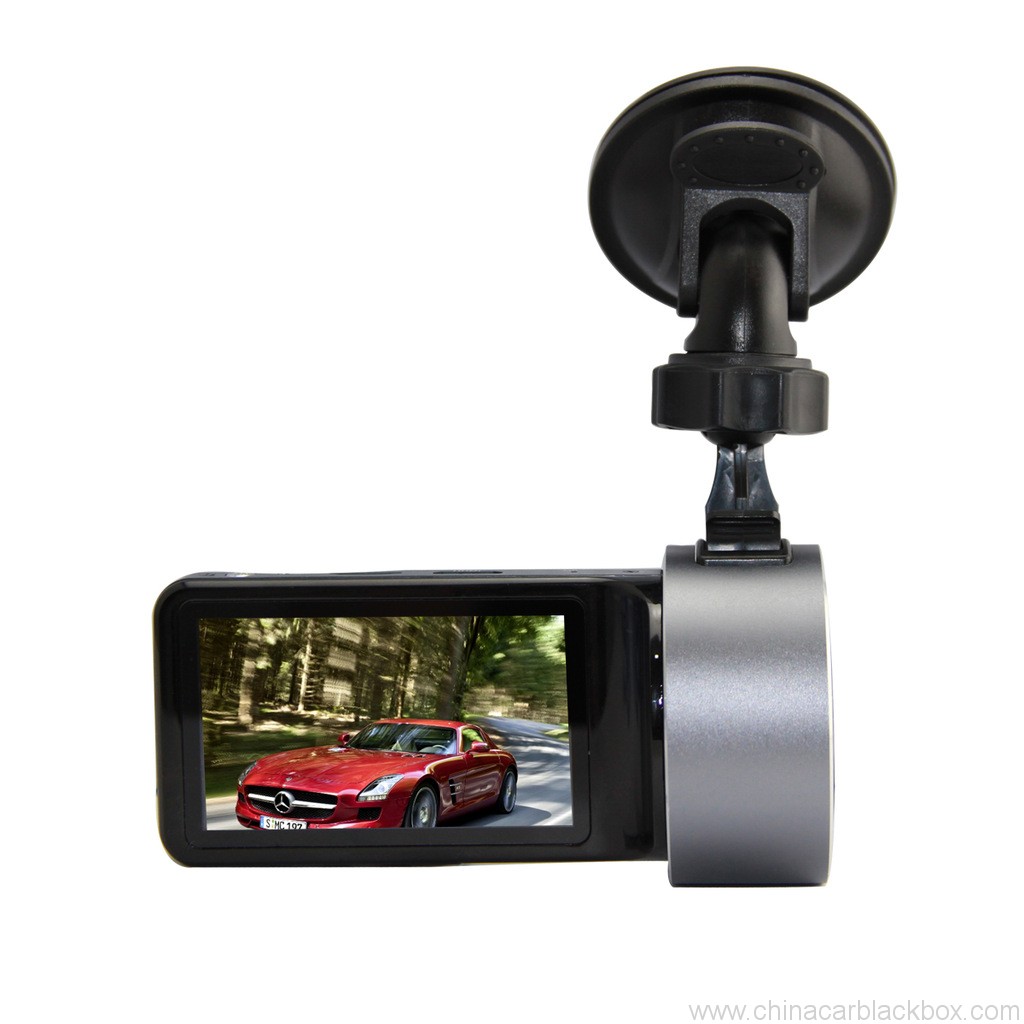
Feature:
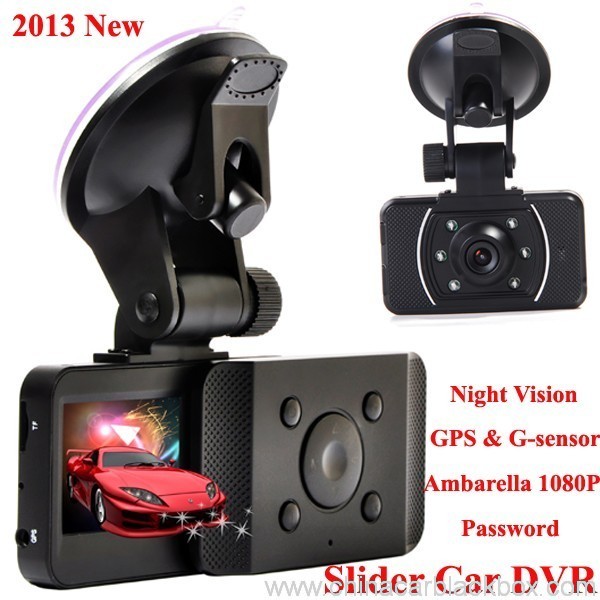
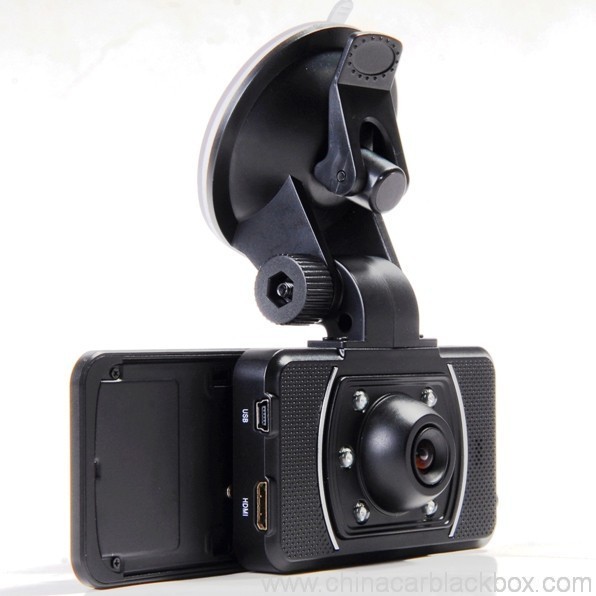
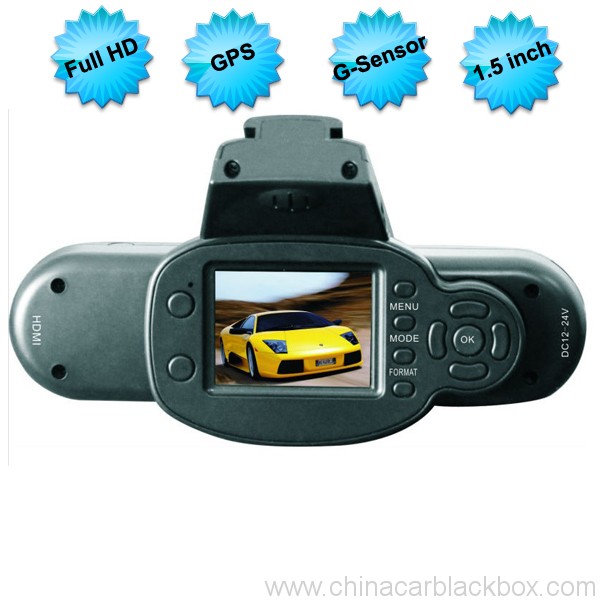
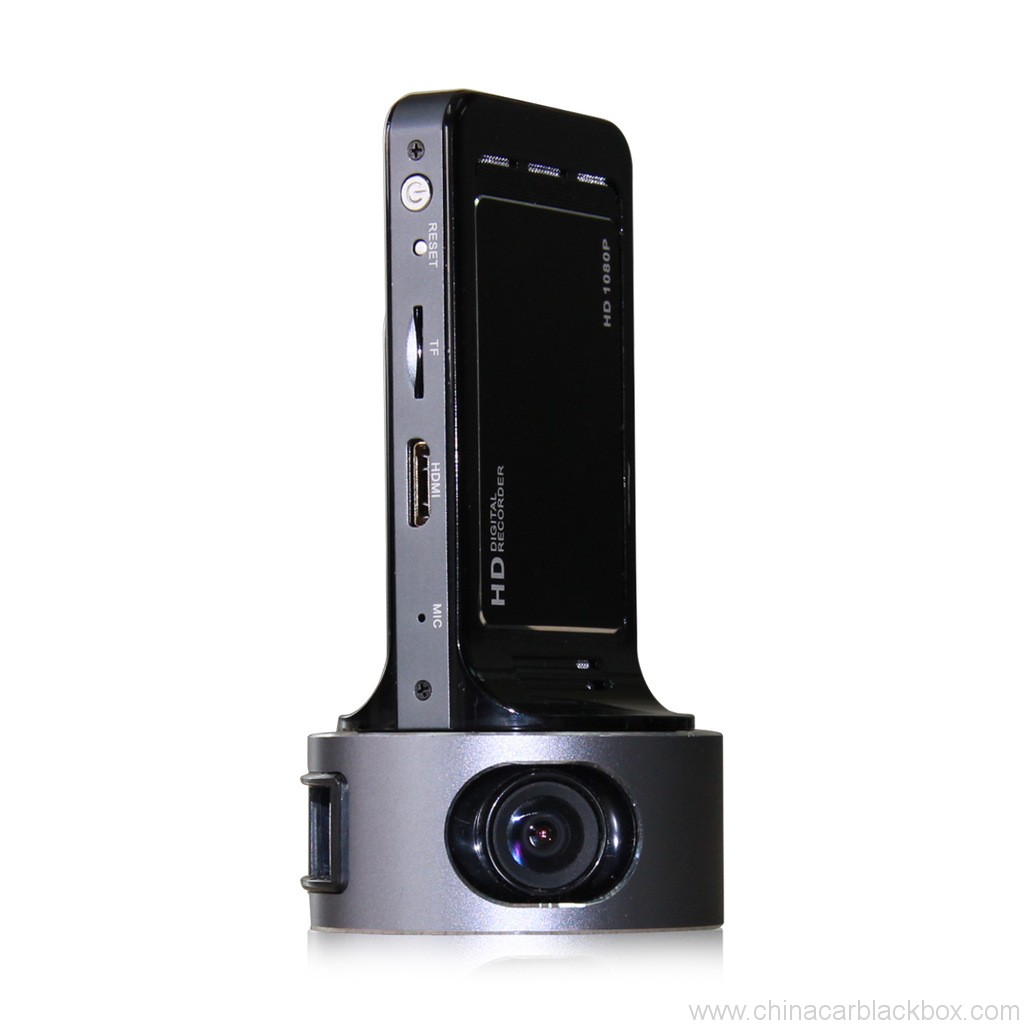
– HDMI high-definition video output
– 2.0″ TFT LCD
– 1920×1080@30fps /1440×1080@30fps /1280×720@30fps;
– GPS Tracker & G-Sensor
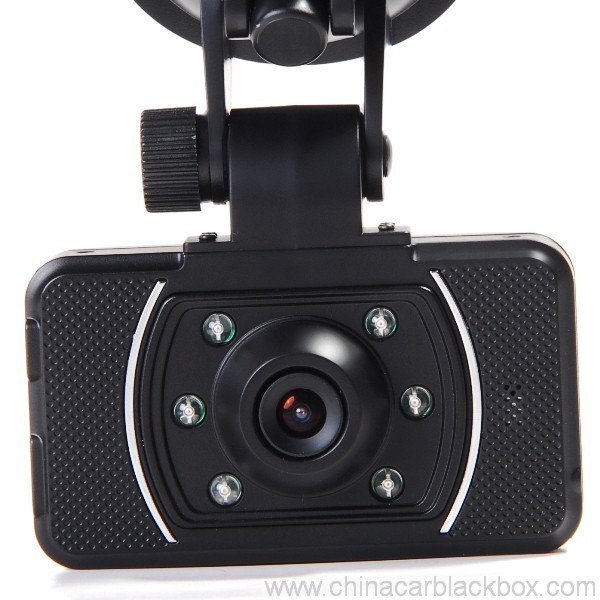
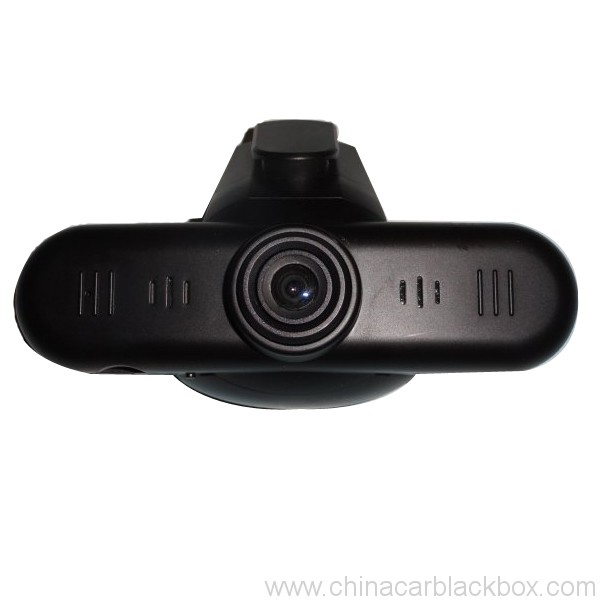
– High-definition wide angle camera, about 120~130 degree
– Video specs: H.264 (MOV)
– Cyclic Recording
– Date Sample: ON/OFF
– Delay Off
– built with microphone (speaker)
– Show Speed on video
– Supports high-capacity TF card
– Password: * * * * * *
Whakatakotoranga:
Circulating video: Off /1 meneti /2 meneti /4 meneti
Mobile detection: High / medium / low / off
Automatically record video once there is power supply: On /Off
Startup delay: Off /5 seconds /15 seconds /30 seconds
Sound recording: On / Off
Television system: NTSC/PAL
Automatic shutdown time: Off /60 seconds /120 seconds /300 seconds
Format: Ae / no
Time setting: 2012.01.01 12:00
Time stamp: On / off
Automatically turn off LCD time: Off /30 seconds /60 seconds /120 seconds
Exit setup: Ae / no
Light frequency: 50HZ/60HZ
Acceleration sensor settings: 1/2/3/4/5/6/7/ no
| Screen size | 2.0 TFT LCD(4:3) Te motuka motuka |
| Arotahi | MI5100 |
| Language | Chinese simplified/traditional Chinese /German/French/Russian/ Italian/ Spanish/Portuguese/Dutch/English |
| Video | 1920х1080@30fps/1440х1080@30fps/1280х720@30fps |
| Video format | MOV |
| Photo resolution | 16M |
| Photo format | JPG |
| Storage unit | Micro SD |
| MIC | Built in |
| Photos mode | Single photo |
| Light source frequency | 50Hz/60Hz |
| Television output | NTSC/PAL |
| USB | USB2.0 |
| Power interface | 5V 1500MA |
| System requirements | Windows 2000/XP/Vista/Windows 7,MAC OS x 10.3.6 and up |
1, Go to the password setting option,press key choose the digital, press OK key confirmation.
input initial code “0 0 0 0 0 0 ” to enter the password setup menu, now there are three options: enable/disable/reset password.
2, Reset password: input same password twice, otherwise reset password will fail.
Connect TV to watch the video and photos
Use the HDMI cable to connect device and television, turn on television to play the recorded videos and photos.
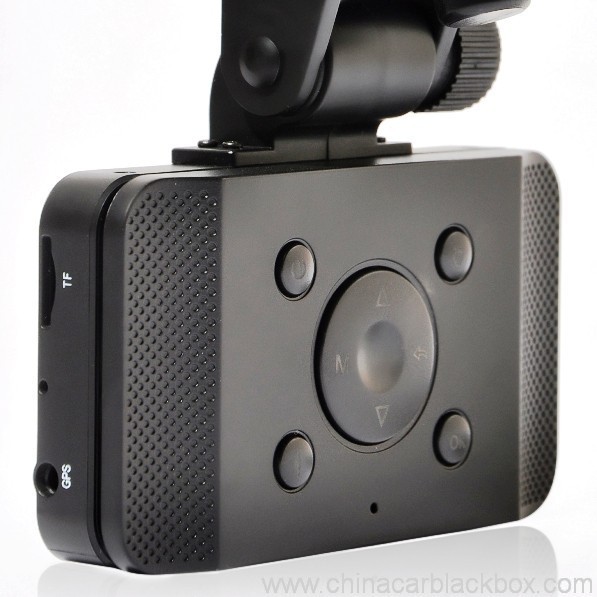
The device has a variety of shortcut operations:
1, In standby mode, press “Down “, turn on/off Mic
2, In standby mode, long press “Voice / One button copy” button, turn off the sound.
3, In any mode, press the “Menu” can return to a the standby mode of recording video
4, In any state, close the slide to turn off the screen.
5. In standby mode, press ” Voice / One button copy ” to copy.
6, In video playback state, long press ” Mode / Return / Lock ” key to protect or unprotect.
7, In the standby of recording video or photographing, short press “Infrared / Delete” for the operations of infrared lamp.
Note:
1. Can use Mode button to switch between video and photo mode.
2. When the battery power is low, the device will automatically turn off the flash function.
Special function set
Password setting:
1. Can set password for the machine, the initial password is: 0 0 0 0 0 0 (six zeros)
2. After inputting initial password, can enable, disable or reset password.
3. You can set your password digit as you like.
Specific operation:
1, Go to the password setting option,press key choose the digital, press OK key confirmation.
input initial code “0 0 0 0 0 0 ” to enter the password setup menu, now there are three options: enable/disable/reset password.
2, Reset password: input same password twice, otherwise reset password will fail.
Browse mode
1. Turn on the device, automatically entering video mode. Press Mode button twice to enter video browse mode, press Mode button again to enter photographing browse mode, video and pictures will be shown on the screen.
2. Press UP or DOWN button to select the videos or pictures you want and press OK to watch.
Note: if enabled password, press Mode button twice to go to password interface and input password.
Delete files: in the process of browsing, press ‘ infrared / delete ‘ button to show Delete menu, select ” Ae” to delete single unprotected files and select the “all ” delete all unprotected video files.
Set language and voice prompt
Open the equipment, automatic into video standby mode, the short by mode button to enter the menu, into the language setting options, language Settings. Voice prompt according to set language broadcast tips
Date and time
To set the current time and date, in the standby mode, press the MENU button, and then use the up and down arrow keys to enter settings page. Set the date and time then press OK to confirm.
Time setting: 2012.01.01 12:00
Acceleration sensor settings
The acceleration sensor has a total of 8 options: 1/2/3/4/5/6/7/ NO
From 1 to 7, sensitivity is more and more high, choose NO to close sensor
Press one button to copy
In the video the standby mode, press “Voice /One button copy ” button to enter one button copy, at this time, the machine starts copying the last file from memory card to its memory.
Save files to computer
This device supports connecting USB cable to computer, after connecting to computer, there will be a dialog box pop up, select “USB connection ” to copy files from the memory card to your computer, or use the player in computer to play.
Note: if you set a password, select “USB connection ” then a password dialog box will bounce out, and connect to computer by inputting password, entering U disk mode.
Simple troubleshooting:
If a fault occurs, try to use the following method to exclude. If you cannot handle it, please contact customer service and repair department.
Not able to record video normally.
– replace SD / MMC card
– change the resolution and frames per second.
– change memory card with greater capacity.
– To ensure that the card is correctly installed (in the installation process, a click can be heard).
– Remove unnecessary files to free the space of memory card.
No GPS signal
– To ensure that the GPS antenna is inserted to the device
– To ensure that the signal is strong
Not able to connect HDMI line to TV
– To ensure that the connections between the HDMI cables ends and the devices as well as television are correct. Or replace the HDMI line to try.
Video or picture is not clear
– To ensure that the camera lens is clean.
– wipe the dust and dirt on the lens.
Device is working properly, but the button does not work
Press the reset button to initialize machine -.
In general please cautiously reset initialization because this operation may cause data loss.
He aha tatou i whiriwhiri ai?
1. Ko nga hua katoa kua tino tirotirohia te Kounga i roto i te whare i mua i te whakakii.2. Ko matou he wheketere hanga CAR DVR mo 5 tau me te kounga pai me te ratonga super.
3. He kaiwhakarato OEM matou mo te maha o nga tohu rongonui Car DVR.
4. 100% Ko te tirotiro QC i mua i te tuku, 12 haora whakamatautau pakeke mo ia hua wae.
5. Ka whakaratohia e matou he hoahoa kore utu kia rite ki o hiahia.
6. Ka taea e matou te whakatuwhera i to ake maaka mena ka hiahia koe.
7. 12 marama pūtāhui kounga.
Tauira & Tukunga
1. Ko te tauira me te ota paku ka tukuna ki roto 2-3 nga ra mahi i muri i te whiwhinga o nga utu me nga korero ota ka whakapumautia.2. Ko nga hua katoa kua pai te whakakii i mua i te tuku,ka taea e matou te tuku i nga taonga ma te hau,UPS,DHL,FEDEX,EMS,TNT etc.
3.Mo te ota neke atu i te 500pcs, te ota whakarite ranei, Ko te wa arahi ka 4-6weeks i muri i te whiwhinga o te utu. Tena koa whakapiri mai ki a maatau hoko ki te whakarite i nga taonga o naianei.

Free Enquiry for Slide Car DVR 1080P 30FPS HD Camera GPS G-Sensor Password
1 arotake mo Slide Car DVR 1080P 30FPS HD Camera GPS G-Sensor Password
Tāpirihia he arotake

Ko etahi patai ka paatai mo Haina Car DVR
Q. He aha te raihana mo te CAR DVR?
A. Mo te CAR DVR, kei a matou 12 marama pūtāhui.Q. He aha te huarahi utu ?
A. T/T . PAYPAL , Western Union , Kei te waatea katoa te L/C. kahore he raruraru mo tena .Q. Me pehea te kounga ?
A. 100% Ko te tirotiro QC i mua i te tuku, 24 haora whakamatautau tawhito mo ia hua wae i roto i ta maatau ruma whakamatautau . ki te kitea tetahi raruraru kounga . I oati a Hengye ki te whakakapi i tetahi mea hou ki ta maatau kaihoko.Q. Kia pehea te roa o te tuku i taku ota?
A. I te wa e waatea ana nga taonga, ka tukuna nga taonga o roto 3 nga ra mahi mo te tauira me te 7-15 nga ra mahi mo te ota ōkawa i te wa i riro mai ai te whakau mo te ota hou.Q. Ma wai e utu te utanga mo te whakatikatika i nga taonga?
A. Ka tohatoha nga taha e rua i te haurua o nga utanga. Ka haria e te kaihoko te utunga mo te whakahoki mai ki a GHY, a ka mataku a GHY ki te whakahoki atu ki te kaihoko. Ka whakaaro a GHY ki te whakahoki mai me te mea hanga papatipu e whai ake nei.Q. E hia te utu kaipuke?
A. Kei runga i te nui o te pai, te tikanga tuku me te haerenga. Ka tukuna e matou nga taonga ki roto 3-5 nga ra mahi i muri i te whakapumautanga o te utu katoa. Mena kaore i te waatea te utu, ka kati aunoa to ota. DHL/UPS/FedEx Express te nuinga o te wā 3-5 nga ra mahi ki te haerenga. A ko te mea mo 5-8 nga ra mahi na EMS, TNT ranei.Q: Kei a koe tetahi ratonga i muri i te hoko?
A:Ae! Kei a matou nga mahi ngaio i muri-hokoQ. Me pehea te whakatakoto ota?
Mena kei a koe tetahi raru hangarau, patai ranei mo nga taonga, nau mai ki te whakapā atu ki ta maatau Tari Tautoko Hangarau. ranei to tatou hoko tika.
1. Īmēra mai te tauira, te ahua o te kurupae me te nui, tukuna mai ranei he patai ki a maatau mo https://www.chinacarblackbox.com/ , nga korero a te kaihoko, te huarahi tuku me nga tikanga utu.Q. He aha to Whakahoki me to whakamana?
↓
2. I mahia te nama ka tukuna atu ki a koe.
↓
3. Whakaotihia te utu i muri i te whakapumautanga o te PI.
↓
4. Whakapumautia te utu me te whakarite i nga mahi.
↓
5. Tukua mai nga taonga 2-15 nga ra(kia rite ki te mana rokiroki).
↓
6. Tukuna te nama aroturuki(mā te hau) B/L ranei(ma te moana).
↓
7. Nga taonga i tukuna, nau mai ota ano!
1.Ka tirotirohia nga taonga katoa i mua i te tuku, na ki te kore koe e makona ki te hoko, Ka taea e koe te whakawhiti i nga taonga i roto i te wiki kotahi me whakapiri mai ki a maatau 24 nga haora o te whiwhinga o to hokonga.
2.Ko te utu kaipuke me te utu whakahaere kaore e whakahokia, ma te kaihoko te kawenga mo nga utu katoa mo te hokinga mai me te whakahoki ano.
3.Ko nga mea katoa e hoki mai ana me noho ki ona ahuatanga taketake, tae atu ki te pouaka me nga taputapu. Ko nga hapa i mahia e nga tangata kaore e taurangi, penei i pakaru, rakuraku me te aha.
4.Mo nga taonga me tuku mai ma te EMS me to panui o to rohe ka whakahokia mai.
5. rara taurangi
a.I roto 7 nga ra o te hoko, ki te mea he raruraru o Car DVR, me whakarereke e matou mo koe, engari me pupuri e koe te kete me te Car DVR kia tino tika.
b.Waranty mo te tau kotahi i muri i te hokonga, pūtāhui pūhiko mō te toru marama.
c.He whai hua noa te ratonga whakamana i te whakamahi noa.
d.Ko nga kino katoa (Te kino o te mata, haea te whakapiri, whakamahi hē) ngaro ranei tenei kaari, e kore e taea e matou te ratonga whakamana.
Nga matauranga me mohio koe mo te Car DVR
Mena kei te whakamahi koe i te kamera, he raruraru iti, Tena koa kia rite ki te whakauru i te tuatahi.
1)Kaore e taea te tuhi ataata noa- huri i te kaari TF
- huri i te whakatau, papa mo ia hekona.
- kōkuhu te kāri pūmahara nui ake.
- kia mohio kua whakauru tika te kaari (i roto i te tukanga whakauru, me rongo koe i te tangi pawhiri).
- mukua nga konae koretake mai i te kaari mahara ki te tuku waahi.
2)Kaore i te marama te ataata
- whakarite e te arotahi kāmera he ma.
- horoia te puehu me te paru i runga i te arotahi, katahi ka pupuhi.
3)Nga taputapu ki te mahi noa, engari karekau te kii e mahi
- pehia te paatene tautuhi hei arawhiti i te miihini.
Q: Me pehea te tiimata?
A: Kei reira 3 huarahi:Q: He aha te momo taraiwa e pai ana mo te kamera paahono?
Ka timata ki te tuhi aunoa, i te wa e tiimata ana to motuka me te kore e mahi i tetahi mea. (I mua i tera, kia mohio kei roto te kaari TF ka hono pai te riihi motuka.)
Mena kaore i te putua te pākahiko o roto, me pehi noa koe i te paatene mana.
Honoa ki te taura USB ma te mono riihi, peeke hiko ranei. (5V 1A me te tauranga USB)
A: Katoa nga taraiwa mai i nga haerenga poto, ki nga haerenga pakihi me nga haerenga hararei. Ka tuhia katoatia e te DVR motuka.Q: He aha i kore ai e taea e taku dvr te mahi tuhi?
Ki te hiahia to mahi ki a koe ki te taraiwa, me mau koe i te DVR kamera taakaha kawe. He pono, Ko nga tangata katoa e peia ana me tiaki i nga kaititiro ka taea e te DVR waka.
A : Pls tirohia to kāri mahara tuatahi, mena kei te kaari kei roto etahi atu ataata taputapu dvr, pikitia ranei, e kore e taea te panui e to taputapu dvr motuka, me whakahōputu tō kāri TF i te tuatahi, He pai ake te whakamahi i tetahi kaari TF kau ki to taputapu dvr ina whakamahi koe i te wa tuatahi.
Q : He aha taku whakaaturanga dvr ka weto aunoa i te taraiwa ?
A : I te nuinga o te wa ka noho te taputapu dvr i runga i te tuunga ki te kore koe i mahi i tetahi mahi i runga ake 1 meneti, engari ka mau tonu te tuhi.
Q: He aha te tikanga ina kopikopiko te kaamera pirihono, ka kopikopiko ranei?
A: Ko te kopikopiko, ko te kopikopiko ranei te waahanga nui e taea ai e te DVR motuka te tuhi ataata tonu (haora i ia haora) ki te kaari mahara kotahi. I te wa e tuhi ana te kamera i roto i te tautuhinga "koropiko" ranei "huringa"., kei te hanga i nga konae ataata, i nga waahanga ranei i roto 2, 5 ranei 10 meneti roa. Ko enei konae ka tuhia, ka tiakina ngatahi (tetahi i muri i tetahi) ki te kaari mahara. Ina whakakiia e te kamera he kaari mahara (me te maha o nga konae), ka whakakorehia te waahanga ataata tuatahi / konae ka tiakina te konae ataata hou. Ka mahi aunoa te kamera, i te wa e ka ana te ahuatanga Loop.
Ratonga OEM/ODM Camera
Ka taea e matou te mahi OEM / ODM Camera mo koe me te waitohu ritenga,tapanga,ā-ringa,pouaka takai whare ranei.
1. Moko
- Tena koa tuku mai i a maatau ake tohu tohu teitei i roto i te AI, cdr ranei;
- Ko te MOQ o te tuhi tohu ko te 100pcs
- Ko te utu ta e pa ana ki nga tae ,i te nuinga o te waa me kore he paanga rōnaki i te waitohu
2. Tapanga
- Tena koa tuku mai i a maatau ake nga nama tauira me nga whakaritenga whanaunga.
3. ā-ringa
- Tena koa tuku mai ki a maatau te konae hoahoa a-ringa kua oti ka taea te ta tika,he pai tetahi reo , Ka taea hoki e matou te whakaputa i nga taarua reo maha.
4. Pouaka Tapaki
- Ka tukuna atu e matou ki a koe te demension me te konae hoahoa;
- Tena koa hoahoatia taau ake ahua i runga i tenei konae ka whakahokia mai ki a matou;
- Ka tukuna atu e matou he pouaka kapi mo to whakapumautanga i mua i te whakaputanga ;
5. Whare
- Mena kei te pirangi koe ki te hanga i a koe ake kete dvr motuka hoahoa ,tena koa tuku mai te konae hoahoa whare , ka whakatuwherahia e matou te pokepoke me te tuku tauira ki a koe i te tuatahi.







Melissa –
Good dash cam.